Google Business Profile Verification
New profile stuck at verification, or a video review that keeps getting rejected? We check what you are eligible for, fix what would fail, and get you verified on Google Maps.
Verification used to be a postcard and a wait. Since Google moved most profiles to video review, it has become the step where a lot of legitimate businesses get stuck, sometimes for months, without ever being told what went wrong.
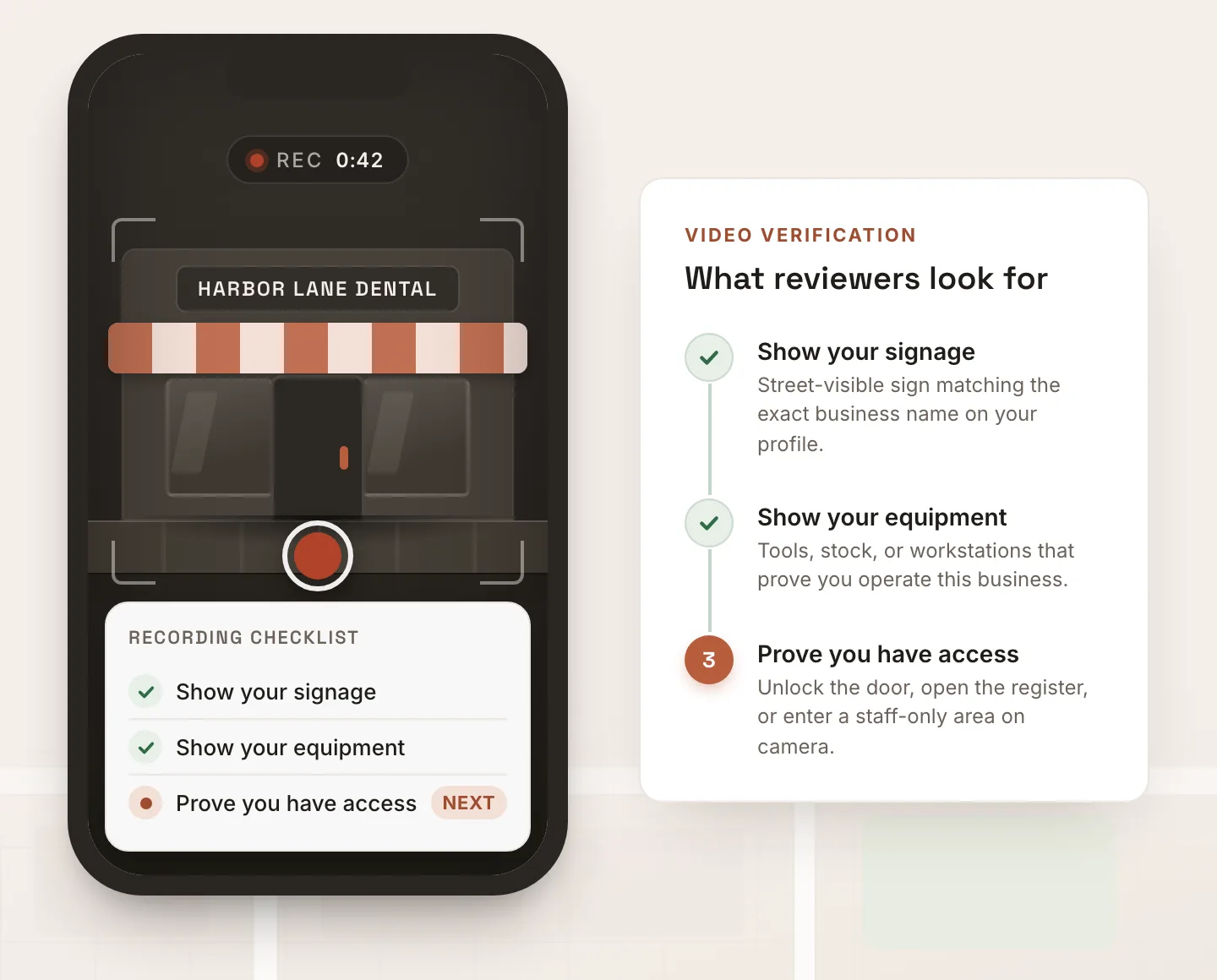
The reviewers are looking for three specific things in one continuous shot: where you are, that you really operate there, and that you are the one who runs it. Miss any of them and you get a rejection with no explanation. Meanwhile the underlying issues, a name with extra keywords, a category that does not match, an address that cannot be confirmed, quietly guarantee the next attempt fails too.
Send me the profile before you burn another attempt. I will tell you which method applies, what a reviewer would reject, and whether your location is realistically verifiable. If it is not, I will say so upfront.

Independent local SEO since 2016
What verification actually decides
Verification is how Google decides whether your business is real, whether it operates where you say it does, and whether you are the person allowed to manage the listing. Until it clears, your profile is not shown to customers, so an unverified profile is effectively invisible on Maps and in the local pack.
The method you are offered is not your choice. Google picks it based on your category, your business type, and the history of the account and address. Most profiles now land on video verification, some get instant routes like phone or Search Console, and postcards have become the slow fallback rather than the default.
What people miss is that verification is not only about the video. A reviewer sees the whole profile. If the business name carries extra keywords, the category does not match what you do, or the address cannot be tied to a real operating location, the attempt fails no matter how good the footage is. That is why we fix the profile before we touch the verification itself.
Verification methods, and which one you get
Video verification
The most common method now. You record a single unbroken video showing your location, proof you operate there, and proof you manage the business. Most rejections happen here, and most are avoidable.
Instant and no-postcard routes
Some profiles are offered phone, email, or Search Console verification, which land in minutes instead of weeks. Eligibility depends on your category, business type, and history. Google decides what is offered, we work with what you get.
Postcard
The old default, and the slowest. Postcards get lost, arrive late, or never come at all. If your only option is a postcard, we help you set the profile up so the code actually arrives and works.
Live video call
Some categories get a scheduled call with a Google reviewer instead of a recording. Same evidence, less room to redo it, so preparation matters even more.
Why verification fails
The video missed what Google needed
A reviewer needs three things in one continuous shot: where you are, that the business really operates there, and that you are authorized to manage it. Missing any one of them is the most common reason for a rejection.
The address could not be confirmed
No visible signage, a unit that cannot be matched to the listing, a mailbox store, or a coworking desk. If a reviewer cannot tie the location to your listing, verification fails.
The category triggered extra scrutiny
Some categories get reviewed much harder than others. Service-area businesses, home-based businesses, and higher-risk industries face more questions and need cleaner evidence.
Your information does not match
When the name, address, or phone on your listing does not match your website, registration, or other listings, reviewers see a mismatch and reject the request.
Too many failed attempts
Repeated rejected attempts can slow you down or lock the option. If you are already a few tries in, stop and get it diagnosed before burning another one.
The profile was suspended, not just unverified
Sometimes what looks like a verification problem is actually a suspension. Different problem, different fix.
See reinstatementHow we get you verified
Free diagnosis
Send us the profile and what Google has offered or rejected so far. We check which method applies, whether your address and category are eligible, and where the risk sits.
Fix what would fail
Before touching the verification itself, we clean up what a reviewer would reject: the name, category, address setup, and how your details match up elsewhere on the web.
Prepare the evidence
We tell you exactly what the video or call needs to show, in what order, and what proof to have on hand, so the attempt is not a guess.
Verify and follow up
We run the verification with you and handle the follow-up if Google asks for more or rejects the first attempt. You are verified and visible on Maps.
What we need from you
- The Google Maps link to your profile, or the exact business name and address you are trying to verify
- Which verification method Google is currently offering you, if any
- What you have already tried and what Google said when it was rejected
- Your business type: storefront customers can visit, service-area, or home-based
- Proof you operate at the location, such as signage, equipment, or a utility bill or lease
- Something that shows you manage the business, for example a dashboard login or business paperwork
Doing it yourself vs having us run it
You can verify a profile on your own. Here is what changes when someone checks eligibility and prepares the attempt first.
| Metric | With us | On your own |
|---|---|---|
| Method | We check what you are eligible for first | Take whatever appears and hope |
| Preparation | You know what the video must show before you record | Find out by being rejected |
| Underlying issues | Name, category, and address fixed before the attempt | Same problems fail again |
| After a rejection | We read the reason and adjust | Retry the same way |
| Honest odds | We say when a location is not eligible | Weeks lost on an unfixable setup |
An honest picture
Free
Verification diagnosis to start
Eligibility first
We check before you burn an attempt
Flat scope
Agreed up front, no surprise fees
Straight answers
We tell you if a location cannot be verified
Getting started is simple
Three steps between a suspended profile and being back in front of customers.
Send your profile
Share the Maps link or address and a short note on what happened.
Get your free diagnosis
We reply with the likely cause, your odds, and a flat scope if it is fixable.
We get you reinstated
We fix the issue and file the appeal, then you are back in front of customers.
Verification questions
Get your free suspension diagnosis
Tell us what happened. We review your profile and reply with the likely cause and your odds of recovery, at no charge. Most replies go out the same day.